
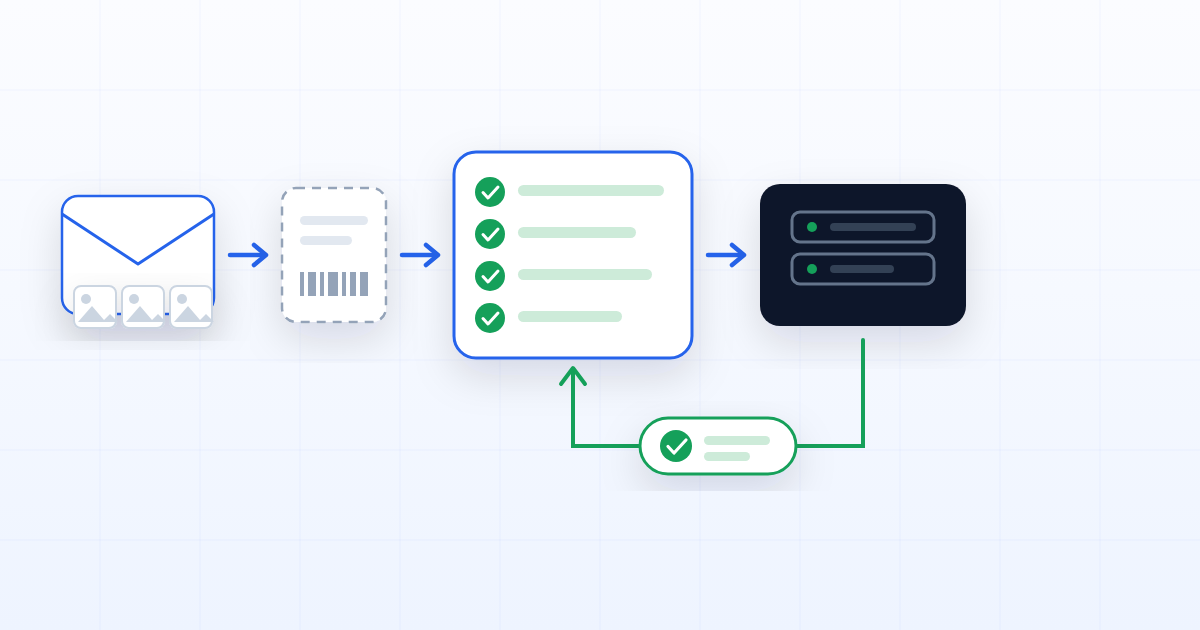
Most document automation is sold as the middle of a process and delivered as the middle of a process. The file is already in the system, somebody has already decided what it is, and the clever part reads it. That leaves the two ends — getting it in, and doing something about it — exactly where they were: with a person, an inbox, and another system's login screen.
Here is the whole thing, using a case an insurer will recognise.
09:14 — an email arrives
A policyholder emails the claims address. Three photos of a bumper, a phone snapshot of the other driver's insurance card, and two lines of text.
Nothing about that email says which policy it belongs to, what kind of claim it is, or what else will be needed. It is, in the system's own words, a file that arrived without a destination.
That is a named thing here, not a gap: an inbound document, with its own reference (IN-2026-004182),
its own state, and its own record of where it came from — the channel, and the sender's own id for the
delivery. One email with three attachments becomes three inbound documents sharing that message id and
differing by content hash, which is precisely what lets a mail connector retry without creating
duplicates. Idempotency is not a feature you notice; it is the reason nobody has to clean up after a
retry.
What it is not: a case parked in a "New" state as a waiting area. That distinction sounds academic until you try to report on it — a queue of things that might be work, mixed into a queue of things that definitely are, is a queue nobody can measure.
09:14 — the system proposes a destination
The extraction reads the photos and the card: a registration plate, a policy number, a date, a place. It matches an existing policy and proposes a process — motor claim, third-party — and a dossier.
A person only appears when the machine is not confident enough. That is the design, and it is the opposite of the usual arrangement where a person approves every automated decision on the grounds that one of them might be wrong. Confidence is a number the system has; using it to decide who looks is what makes the volume manageable.
09:15 — the dossier is created already knowing what it needs
The process prescribes what a complete claim holds: photographs of the damage, the other party's details, a signed declaration, a repair estimate. When the dossier is created those requirements are copied into it, so the case itself can say what is missing.
Two of the four are already satisfied by what arrived in the email. Two are not.
This is the moment where most automations quietly become a to-do list. Here it is a state: the dossier is incomplete, it says which two, and it cannot advance until they arrive. Nobody has to remember to check.
09:16 — the missing pieces are requested, and arrive at the dossier
The claimant gets a link to the dossier itself, rather than an email listing what to send. They open it, see the two outstanding items, and upload into the slot each belongs to. No account, no attachment thread, nothing to file afterwards.
(That half has an article of its own — see «Send the dossier, not the list of documents».)
11:40 — the process ends by filing the claim
Every requirement satisfied, the approvals recorded in order against the state they were given for, and the dossier does the thing the whole exercise was for: it calls the policy system.
Not a notification. Not an export somebody imports. A process may carry exactly one external operation — zero or one, enforced by a unique index rather than by convention — and it builds the payload the insurer designed, calls their API with credentials that live encrypted and are never readable from the dossier, and then waits.
The waiting is the part that is usually missing. The policy system answers with a claim number, and that number comes back onto the dossier. The case closes carrying the reference that proves the work happened, in the system where it actually happened.
What made it autonomous
Read back through it and notice what is doing the work. Not the extraction — that is the visible part and the easiest to buy. What made this run without a person in the middle is duller:
- The document could arrive without a destination, so nothing had to exist before it did.
- The delivery was idempotent, so a retry was free.
- The dossier knew what complete meant, so "what is missing" was a query and not a judgement.
- The transition was refused while it was incomplete, so nothing advanced half-done.
- The process owned an external operation, so the end of the flow was work rather than a folder.
Take any one of those away and a person has to stand in the gap it leaves. That is why automations that are only clever in the middle need as many people as they did before — the staff move from doing the work to feeding the machine.
The honest limits
The photographs still have to be legible, and no system will tell you whether the damage in them is consistent with the story. A confidence threshold set too high sends everything to a human and you have bought a queue; set too low and it files claims against the wrong policy. And the external call is only as reliable as the API on the other end — which is why the failure has to be a state the dossier carries, retryable and visible, rather than an exception in a log.
None of those are reasons not to do it. They are the parts to decide deliberately, because each one is somebody's job to get right, and the automation does not remove the job. It moves it to the beginning, where it is cheaper.