
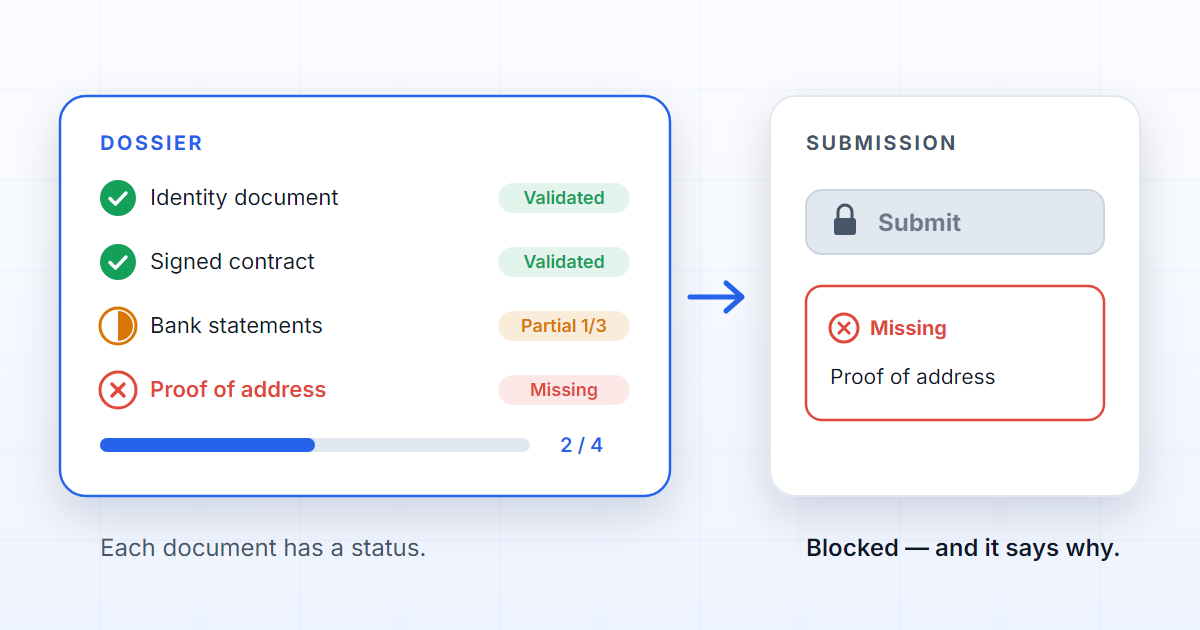
A document checklist is not a decorative list beside a folder. It is an operational rule: without the right documents, in the right state, the process does not move on. In traditional document management, somebody looks at the folder and decides whether everything is there. With a governed document checklist, the system knows what was expected and the state of each document, and refuses the submission when something is missing — saying what.
That difference changes the quality of the control: a folder stores, a checklist evaluates.
Why loose checklists fail
Checklists in Excel, Word or e-mail are not a bad idea: they are cheap, everybody can read them and they serve a one-off process well. The trouble starts with repetition.
A loose checklist works for as long as somebody keeps it in step with the folder. When the process changes, the checklist has to change — and the copies already in circulation do not. When a document arrives, somebody has to tick it. When a file is replaced, somebody has to check the tick again.
None of this is hard once. The problem is doing it every time, without forgetting, across dozens of dossiers. A loose checklist describes what the folder should hold; it never knows what it does hold.
Traditional document management vs a document checklist
| Traditional document management | Governed document checklist | |
|---|---|---|
| Where the list lives | In a spreadsheet, an e-mail or somebody's head | In the dossier itself, copied from the process |
| Who decides it is complete | A person, at the end, looking at the folder | The system, at any moment, by the same rule |
| State of each document | It is there or it is not | Six states, including partial, needs correction and expired |
| How many files | As many as fit in the folder | A minimum and a maximum per document |
| What happens on submission | It goes through; somebody finds out later | The submission is refused, naming what is missing |
What a document checklist has to know
To block well, a document checklist has to know more than "there is a file":
- which documents are mandatory and which are optional;
- how many files each document requires, at minimum;
- whether there is an upper limit, so that "signed contract" does not receive forty attachments;
- whether a document is missing, partial, uploaded, validated, needs correction or expired;
- which fields are mandatory on the dossier, on the document or on the attachment;
- what message to show when something blocks the submission.
Six states, not a checkbox
A checkbox has two values; reality has more. A required document is always in one of these states:
- Missing — nothing has been supplied.
- Partial — there are files, but fewer than the required minimum.
- Uploaded — enough files are present, still without human validation.
- Validated — a person confirmed it is the right document and fit for use.
- Needs correction — a person rejected it or asked for a replacement.
- Expired — the document is no longer valid.
These states belong to the document, not to the dossier: an advanced dossier can hold an expired certificate, and a freshly created one can have every mandatory item validated. A submission has to look at both levels.
Minimum and maximum files
A document is a single-level folder that accepts one or several files. By default, a mandatory document requires at least one file. The minimum can be higher: "last three bank statements" is a document with a minimum of three, and with two files it is partial, not uploaded. The maximum covers the other extreme: an upload that would exceed the ceiling is refused there and then, where correcting is cheapest.
Blocking is not obstruction
A good refused submission is a feature, not an obstacle. It stops incomplete work from moving on to approval, to AI processing or to an operation in an external system — where the gap costs far more to undo.
But a refusal is only good if it is specific. "Validation error" merely irritates; "proof of address is missing" helps. The right message names the document and the shortfall: "Proof of address has no files", "Bank statements: 2 of 3 files", "Insurance certificate expired on 14 May". Whoever reads it knows what to do next.
A second, less obvious rule: block only what belongs to the person submitting. A missing mandatory document is theirs to fix, so the submission is refused. A field or a checklist item that somebody else can complete later does not justify a refusal: the dossier is visibly held waiting until it is resolved.
The right block reduces rework because it catches the failure while it is still cheap.
Where DOK Genius comes in
In DOK Genius, the expected documents come from the process and are materialised into the dossier when it is created: an empty dossier is already the complete list of what is missing. Each document carries whether it is mandatory, its minimum and maximum files and its own status, separate from the dossier's state — and the submission respects both levels. The article on what a governed dossier is explains why that list is copied rather than referenced.
In practice, the dossier screen is a guided sequence: the side panel shows what is missing and what blocks the transition, and the refusal names the document. The dossiers manual walks through it step by step, and the features page shows how the checklist connects to approvals, quality review and external operations.
Completeness therefore stops being an opinion at the end. It becomes a rule followed throughout the work.
FAQ
Is a document checklist the same as a task checklist?
No. A task checklist is ticked by a person. A document checklist is evaluated by the system from what exists in the dossier: how many files each document has, whether somebody validated them, whether they are still valid. The first records an intention; the second verifies a fact.
What happens when a document expires in the middle of the process?
The document's status becomes expired and the submission is refused with a message naming the document and the date it lapsed; replacing the file clears the block. The chapter on expiring documents explains how to keep track of validity; renewal campaigns are on the roadmap.
Can a document checklist have optional documents?
Yes. An optional document never blocks the submission, but it still has a status, a minimum and a maximum, and it still appears in the dossier. That tells "it was not needed" apart from "somebody forgot", a distinction a folder cannot make.