
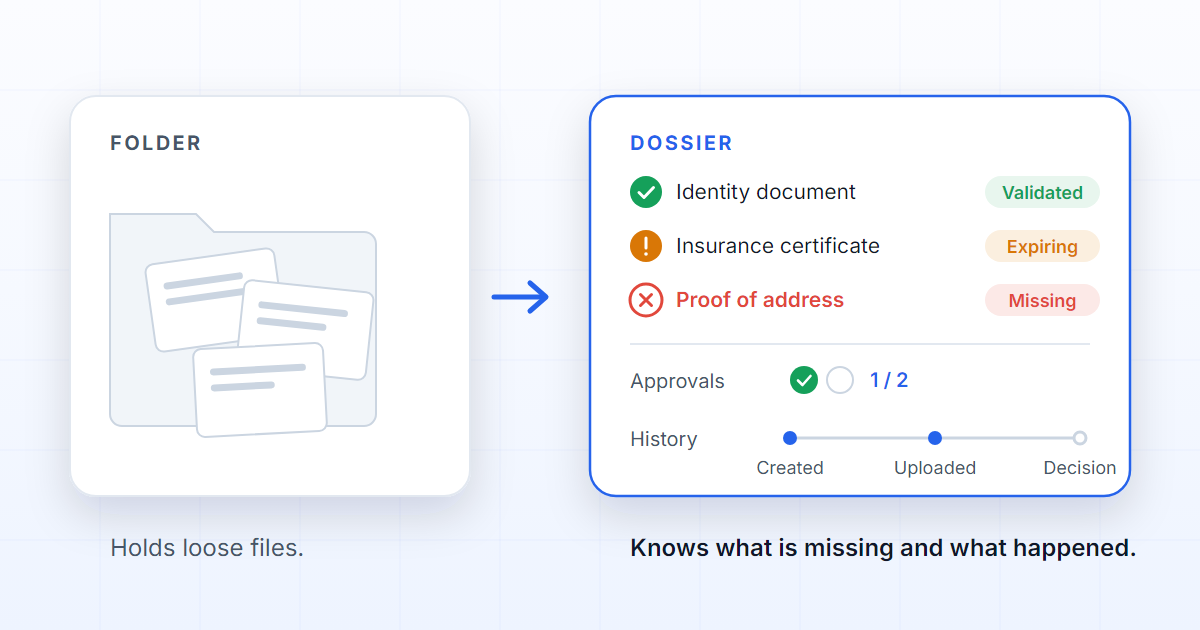
A governed digital dossier is more than a folder where files are kept. It is a case of work that knows which documents it expects, what state each one is in, who may open each part, which decisions have already been taken and what is still missing before it can move on. A folder answers the question “what is in here?”. A governed dossier answers a different one: “what is missing before this is finished?”.
The difference sounds small, but it changes everything. A folder accepts any file. A dossier is created from a process and brings a structure with it: mandatory documents, fields to fill in, submission rules, approvers, quality review, confidentiality and history. Before anyone uploads the first file, the dossier can already say what is missing.
Why a folder is not enough
Folders are good at storage, and the tools around them are good at what they do: SharePoint stores, versions and searches files reliably, an Excel sheet keeps a list of what has already arrived, email is where the conversation happens. None of them was designed for the operational questions that appear the moment a file becomes part of a case:
- Is this case complete?
- Was the right document delivered, or just a document?
- Is it still valid, or did it expire after it was filed?
- Who approved it, and what were they looking at when they did?
- Did somebody work on the wrong version?
- Is there a restricted document that not everyone should open?
When those questions live in Excel, in email or in the memory of whoever is following the case, governance depends on people remembering — and a control that exists only while somebody is paying attention fails quietly. A governed digital dossier puts those rules inside the system, where they are evaluated every time.
| Folder | Governed dossier | |
|---|---|---|
| What it accepts | Any file | The documents the process prescribes |
| Knows what is missing | No | Yes, from the first moment |
| State of each document | Exists or does not | Missing, partial, uploaded, validated, needs correction, expired |
| Validity | Not recorded | A property of each document |
| Who decides | Unknown | Approvers set by the process, with a record |
| History | A modified date | Who did what, when, and on which version |
What a dossier should know
A modern dossier should know at least five things:
- Which documents are expected. The list comes from the process and exists before the first file. Each document is a requirement — “Signed contract”, “Identity document” — and declares whether it is mandatory and how many files it accepts.
- Which files were delivered. A document can hold one file or several. Requirement and delivery are different things: that is why a dossier can say “partial” instead of “there is something here”.
- Which data was extracted. A contract number, an expiry date, a name — read from the file and kept in the dossier, rather than copied by hand.
- Who has access. Computed from who the person is and which part of the organisation the dossier belongs to, not from who received the link. Restricting individual documents inside a dossier is on the roadmap.
- Which events happened. Who created it, who uploaded, who validated, who approved, when, and on which version.
And it must keep its own state separate from the state of each document. A dossier can be awaiting approval while one of its documents has expired; a dossier that is barely touched can have every mandatory item already validated. Folding both into one percentage hides exactly the risks worth seeing. That is also why submitting a dossier with a mandatory document missing is refused at that moment: the rule is in the system, not in somebody’s memory.
Where AI comes in
AI helps to read, classify and extract data, but it does not replace governance. A model that reads a contract and returns the end date saves minutes; one that reads the wrong file and returns a date with complete confidence costs far more, because nobody notices the mistake.
The real value appears when AI works inside a process. It knows which document is expected, so it reads an insurance certificate as an insurance certificate and not as “a PDF”. It respects the dossier’s permissions, so it does not fetch what the person asking was never allowed to see. It flags exceptions instead of hiding them. And when confidence is not enough, the case waits and a person decides. That stopping point is quality review, and it is what makes automation worth trusting.
That is what DOK Genius proposes: turning documents into dossiers that carry the work through to the decision, the external operation and the final evidence. A governed dossier does not end in a tidy folder: it ends when the system that owns the operation has received what it needed. The features page describes each piece, the dossier manual shows how one is worked, quality review explains where the person comes in, and the security page describes how access and history are protected. The longer read on the same idea is What a dossier actually is.
FAQ
Is a dossier the same as document management?
No. Document management stores, versions and organises files, and does that well. A governed dossier controls the process those files support: it knows which documents are required, what state they are in, who decides and what has happened.
What is the difference between a folder and a dossier?
A folder accepts any file and has no opinion about what it is missing. A dossier is created from a process, knows which documents it expects and which are mandatory, and refuses to move on while one is missing. A folder can be tidied; a dossier can be finished.
Can a dossier hold several documents?
Yes. Each document is a requirement — “Proof of address”, “Insurance certificate” — and can hold one file or several. That separation is what lets the dossier say a document is partial, validated or expired.
Does the AI decide on its own?
No. AI speeds up reading, classification and data extraction. When confidence is not enough or the decision is sensitive, the case stops in human review and the decision is recorded with the name of the person who took it. Automation handles what is repeatable; a person decides what has consequences.