
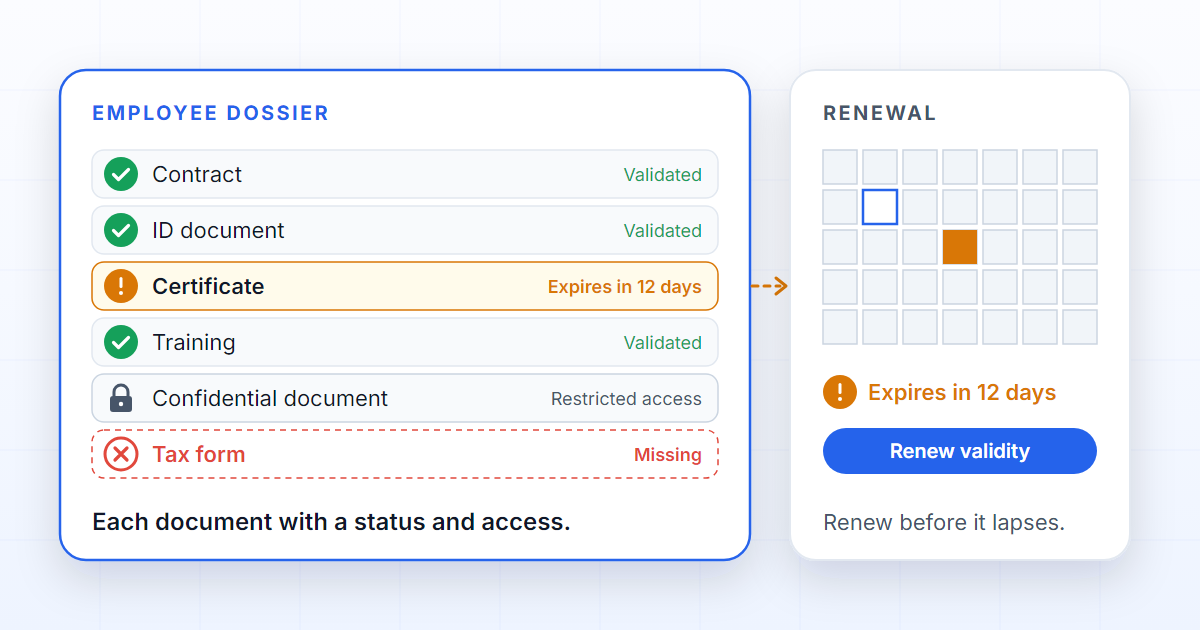
A digital employee dossier is not a folder with the person's name on it. It is the list of documents the organisation has decided to require for that person — contract, identity document, certificates, training — where each document knows whether it is missing, whether it is still valid, who validated it and who may see it. AI-assisted document management for HR starts with that list, not with the model that reads the files.
Human Resources processes depend on documents that change over time. An onboarding may begin with identification, tax details, a contract, supporting documents, certificates and internal forms. Months later come renewals, training, appraisals, medical documents, contract addenda or supporting documents that expire.
When those documents live in shared folders and spreadsheets, the HR team spends too much time confirming the basics: what is missing, what has expired, who validated it, which document is confidential and what has to happen next. It is not for lack of tools: SharePoint stores and versions well, a spreadsheet keeps a list with dates well, and email is where the documents arrive. None of them knows what the file it holds is for — which is why none of them can say what is missing.
DOK Genius structures those flows as governed dossiers. Each kind of HR process — onboarding, contract renewal, change of role, departure — can define the expected documents, the fields to collect, the validations, the deadlines, the confidentiality rules and the review steps. Which documents to require remains the organisation's decision; DOK Genius makes sure it is applied and recorded.
Onboarding and the document checklist
During onboarding, the team needs everything ready before the start date. DOK Genius organises mandatory and optional documents by process, and a typical onboarding process declares something like this:
| Document | Mandatory at onboarding | Has a validity | Who usually validates |
|---|---|---|---|
| Signed contract | Yes | Only if fixed-term | HR |
| Identity document | Yes | Yes | HR |
| Professional certificate | Depends on the role | Yes | Technical lead |
| Mandatory training | Yes | Yes, renewed periodically | Training or safety |
| Medical document | When applicable | Yes | Restricted access |
Each new employee gets a dossier with that list already in place: before a single file is uploaded, the dossier knows what needs to exist. If a mandatory document is missing, submission is blocked and the dossier shows which one. If a file needs correcting, the document's own status (“needs correction”) says so, without anybody digging through old messages. The manual shows working a dossier, and what a dossier actually is explains why the list is copied into the dossier rather than referenced.
Documents that expire
Many HR documents are not static. Certificates, mandatory training, permits, medical documents or supporting documents have a limited validity — and a document that lapsed quietly costs more than one that never arrived, because nobody is looking at it.
In DOK Genius, validity is a property of the document, declared in the process. When an expected document requires an expiry date, “expired” becomes a status of the document, like “missing” or “validated”; the documents expiring screen lists, one row per document, what has expired, what is due within 30 days and what is due in 31 to 90 days, as three separate counts; and the validity can be renewed, or the file replaced, from that list.
Renewal campaigns — asking each affected employee for the new document, recording the delivery and reminding whoever has not delivered yet — are on the roadmap and can be followed on the roadmap. Today, renewal is done document by document, from the list.
In an internal audit, an inspection or a contract review, the question is what was valid on a given date and who confirmed it. The dossier's history records every validation, replacement and decision, with author and date.
Confidentiality per document
Not every HR document should be seen by the same people. A contract, a training certificate and a medical document may belong to the same dossier and yet call for different levels of access.
Today, confidentiality is set at the dossier level, inherited from the process by default, in four levels — public, internal, confidential and restricted — and combines with each user's organisation unit and role. That separates occupational health dossiers from onboarding dossiers; it does not separate two documents inside the same dossier.
Fine-grained confidentiality per individual document, on the roadmap, will let each document carry its own access policy. Somebody who can open the dossier will see that a restricted document exists, but not its files, its preview, its extracted text or any sources the assistant draws from it. The dossier stays complete without exposing sensitive information to people who do not need it. The current access model is described under security and in teams, units and who sees what.
AI with a person in the loop
AI helps classify documents, extract fields, detect expiry dates and spot inconsistencies. But HR processes call for care: an expiry date read from the wrong line of a medical certificate is worse than no date at all.
So DOK Genius pairs automation with human review. What the AI reads is a proposal until a person confirms it in the quality review; approvals are recorded against the state of the dossier at the moment of the decision; and the history is auditable.
FAQ
Does DOK Genius replace the HR system?
Not necessarily. The HR system remains the owner of the employee record and of payroll; DOK Genius governs the document layer underneath those processes and connects to HR systems, ERPs or internal tools when the process requires it — see integrations.
Can I track documents that expire?
Yes. Each expected document can require an expiry date, and the documents expiring screen lists everything that has expired or is about to, with renewal from the list. Bulk renewal campaigns are on the roadmap.
Can sensitive documents have restricted access?
Yes. Today, confidentiality is set per dossier, in four levels. Confidentiality per individual document, inside the same dossier, is on the roadmap.
Does the AI validate an employee's documents on its own?
No. The AI classifies, extracts fields and proposes expiry dates; a person confirms them in the quality review before the document becomes “validated”.