
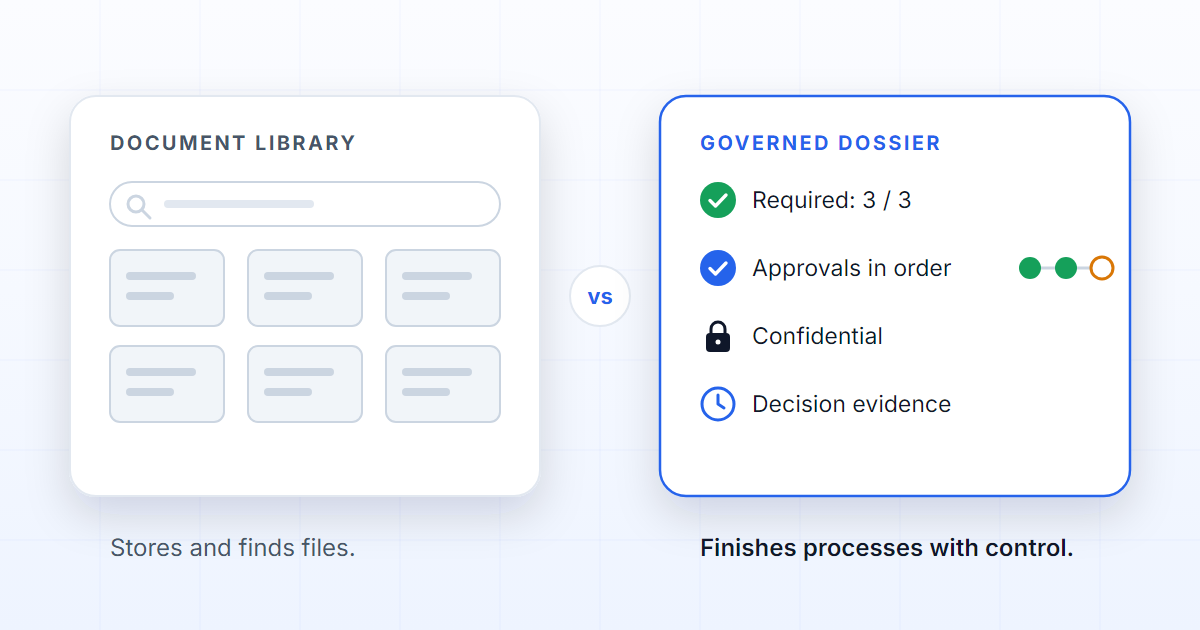
SharePoint is an excellent platform for storing, sharing and collaborating on documents. But when the work requires knowing which documents are mandatory in a case, which version was approved, who may open each part and which operational decision depends on each file, a document library stops being enough. The difference fits in one sentence: SharePoint helps you find documents; DOK Genius helps you finish document processes with control.
The right question is not "which one is better?". It is "which problem am I trying to solve?". They are different problems, and the table below separates them need by need.
| Need | SharePoint | DOK Genius |
|---|---|---|
| Storing files | Very strong | Included |
| Collaborating on documents | Very strong | Complementary |
| Knowing what a case is missing | Configuration or external process | Native to the dossier |
| Blocking an incomplete submission | Usually custom | A rule of the process |
| Human review of AI results | Custom | Quality Review |
| Confidentiality per case | Possible, with complex design | Part of the governance model |
| Evidence of the decision | Spread across versions, lists and flows | The dossier's history |
Where SharePoint shines
SharePoint is at its best when a team needs a collaborative document base: internal policies, document templates, files shared across departments, an intranet, versioning and general permissions per library or per site. It is part of Microsoft 365, and almost everybody knows it. Co-editing a proposal or publishing the onboarding handbook is the work it was designed for, and it does it well.
Many companies should keep using it for that. Replacing a repository that works because of a process that does not is trading one problem for two.
Where the limits begin
The limit appears when the folder starts to stand for a process. A claim, an onboarding, a document renewal or an audit does not just need files. It needs rules: what is mandatory, who decides and in what order, what blocks progress, when a document expires, which external system receives the outcome and what evidence proves the decision.
None of this is impossible in a library; it simply has nowhere to put it. Without a model of its own, the rules end up in metadata columns, lists, Power Automate flows, spreadsheets, emails and operational discipline. Each piece is reasonable on its own; together they form a process that exists only while somebody is paying attention. It works until it fails — and when it fails, it is hard to prove where. And every new process is a new set of custom lists and flows, maintained by whoever built them until that person changes roles.
What DOK Genius adds
DOK Genius starts from the process and materialises a dossier. The process is the template: it declares which documents a case of that kind must hold, which fields it collects, who approves, which unit of the organisation it belongs to and what confidentiality it has by default. Opening a dossier copies those rules into the case, so an empty dossier is already the complete list of what is missing — the idea is explained in what a dossier actually is.
From there, every dossier knows which documents it expects and what state each one is in; it controls its own states; it routes approvals in the defined order; it calls a person through Quality Review when the AI should not move on by itself; and it keeps the history of who did what, when, and against which version. The AI does not work on a generic folder: it works on a governed case.
When the last approval lands, the process does not end in a folder. It calls the system that owns the operation — the claims system, the ERP, the CRM — waits for the answer and closes the dossier with the reference that came back. Integrations run both ways, through an API and webhooks, and what was sent is recorded next to what was decided. The step by step of a case is in the dossiers manual; the full list of capabilities is under features.
Two notes of honesty. Confidentiality is defined per case today, through organisation units and the process; per-document confidentiality is on the roadmap. And the dossier's history already answers "who decided what, and against which version"; the audit evidence pack, exportable in one go, is likewise on the roadmap.
When to use each
Use SharePoint as the repository and the collaboration space for documents: it is where policies, templates and shared knowledge should live. Use DOK Genius when the document is part of a regulated operation that needs completeness, decision, confidentiality and evidence — when somebody eventually asks "how did you know this was complete?" and the answer has to be a record rather than a reconstruction.
The two coexist without conflict: the contract template stays in SharePoint; this customer's signed contract, for this case, with this approval, lives in the dossier.
The practical difference: SharePoint helps you find documents. DOK Genius helps you finish document processes with control.
FAQ
Does DOK Genius replace SharePoint?
No, and that is not the goal. SharePoint remains the organisation's collaborative repository; DOK Genius handles the cases where documents are part of a regulated process, with mandatory documents, approvals, confidentiality and evidence. Most organisations need both.
Can I not do the same with lists and Power Automate?
You can build something similar, and many teams have. The difference is in who maintains the rules and where the proof lives. In a dossier, the mandatory documents, the block on incomplete submissions, the order of approvals and the history are the data model itself, not a custom configuration layered on top of a library.
How does the AI behave differently?
In a generic library, an assistant answers from whatever it can reach, including the wrong version of a document or a file the asker was never meant to see. In a dossier, the AI reads identified documents, each with a state and a current version, and a person confirms the result in Quality Review when the process requires it.
What evidence remains of each decision?
Who added each document, who validated it, who approved and when, and against which state of the case the decision was taken. A document replaced after the approval does not rewrite the approval. The history exists today; the exportable evidence pack for audits is on the roadmap.