
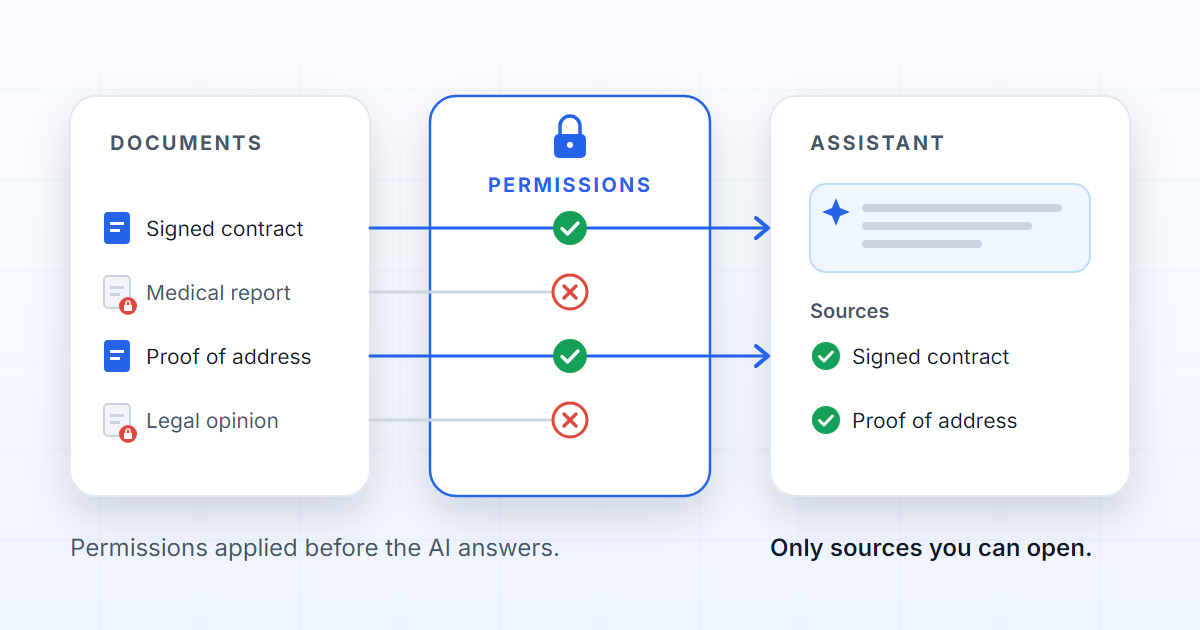
An enterprise AI assistant is only as safe as its sources. Asking the prompt to "respect permissions" is not enough: if the search engine underneath returns documents the reader was never allowed to see, the answer can reveal content the normal interface would never show. Governed RAG is the rule that prevents it — access control applied where documents are retrieved, before the AI answers, so that the assistant only cites sources the user could open on their own.
RAG (retrieval-augmented generation) is the technique in which a model answers from passages retrieved from an organisation's documents; "governed" means the retrieval obeys the access rules of everything else.
The hidden risk
Most teams evaluate an assistant by asking whether it answers well. The critical question is another: which documents did it read to answer? If a user without access to a restricted document receives a citation from it, the damage is done. The answer can be deleted; the information has been seen.
What makes the risk hidden is the absence of symptoms: no error, no warning, nothing in the conversation says a boundary was crossed.
That is why, as argued in Why your AI assistant answers with the wrong document, security in RAG is not a line in the prompt. It is a rule in retrieval.
A prompt is not a security mechanism
The temptation is strong: write "do not reveal confidential documents" in the system prompt and consider the matter closed. Three reasons that is not security.
- The prompt arrives late. A RAG system searches, assembles the context and only then generates; when the instruction is read, the passages are already in the context.
- The model does not know what the user may see. It has no access to roles, scopes or teams, and a restricted document rarely announces itself in the text.
- An instruction is a preference, not a guarantee. It is followed with high probability, not certainty, and the question itself can push the model the other way.
Filtering the answer on the way out has the same defect: the document has already been read.
| Rule in the prompt | Filter on the output | Filter in retrieval | |
|---|---|---|---|
| When it acts | Document already in the context | Answer already written | Before the model reads |
| What the model sees | Everything the search returned | Everything the search returned | Only what the user can open |
| Survives a hostile question | No | Partly | Yes |
| Records what it excluded | No | Rarely | Yes |
What retrieval has to prove
The rule fits in one sentence: the list of sources handed to the model must be a subset of what the user could open in the application. "Could open" includes every dimension the application already uses: the tenant (the organisation the user belongs to), the role, the scope, the team, the dossier the question is asked in, and the confidentiality of the document itself.
One direct consequence: the same question produces different sources for users with different permissions. That is not a defect; it is the correct behaviour.
And it is testable, but only negatively. Proving that a source appears for someone who may see it proves nothing about security. The test that matters is the second: from an account with no access, ask the question that ought to bring back the restricted document and confirm that it disappears from the sources — from the sources, not merely from the answer.
A well-kept shared drive already knows who may open which folder. The mistake is building a search index that forgets it.
What DOK Genius does
In DOK Genius, the Genius — the assistant — is part of document governance, with two practical consequences.
The first is that answers carry sources: every answer says which documents and which dossiers it came from, and those sources stay available for later review.
The second is that the dossiers' access policy is applied before the Genius answers. The search runs inside the tenant and the user's authorised context: dossiers that user cannot see stay out of the search, not merely out of the answer. It is the access model of the rest of the platform's features, described on the security page.
One dimension is missing, and it is honest to say so: the confidentiality of each document inside the dossier. Bringing that level into the Genius's filter is on the roadmap, together with document-level confidentiality. Until then, the rule is the dossier's — and an AI that finds the right answer in the wrong document is still a problem.
A checklist for evaluating an enterprise RAG
Six questions, and the answer you should hear.
- Does retrieval know the user? The search runs with the permissions of the person asking, not the application's.
- Are permissions applied before generation? The filter sits where passages are selected, not in the prompt and not on the answer.
- Are the sources available for audit? Every answer keeps which documents it read, and that list can be consulted later.
- Does document confidentiality enter the filter? Not only access to the dossier or the folder: the level of the document itself.
- Are there negative tests? A restricted document disappears from the sources for a user who cannot see it, and the test is repeated when permissions change.
- Can the interface open the cited source? A citation that cannot be opened cannot be verified.
If the answer to any of these is "no", the AI may know too much.
FAQ
What is governed RAG?
RAG in which retrieval obeys the same access rules as the application: tenant, role, scope, team, dossier and document confidentiality. In practice the assistant only reads, and therefore only cites, what the user could open on their own.
Isn't it enough to tell the model not to reveal confidential documents?
No. When the instruction is read, the document is already in the context; the model does not know what each user may see; and an instruction is followed with probability, not certainty. A prompt improves the tone and shape of an answer, but it is not a security mechanism.
How do you test whether an assistant respects permissions?
With a negative test: pick a restricted document and a question that would certainly bring it back. From an account that may see it, confirm that it appears in the sources; from an account that may not, confirm that it disappears. Repeat whenever permissions change.